Table of Contents
Source Management
Source Management is the process of managing Sources within a DP. DP's often have specific requirements for their product that only certain ASU's can meet. Thus a rule is required which only allows product from certain sources to be supplied to that DP. This is called a “Mandatory Source”
Adding and removing an approved source from a DP
The process of adding or removing mandatory sources is as follows.
1.) Within ALTO, search for the DP you would like to edit the source of.
2.) On the delivery point tab, located on the left side with the Distribution point page you will see a row called “Mandatory Sources” and source assignment
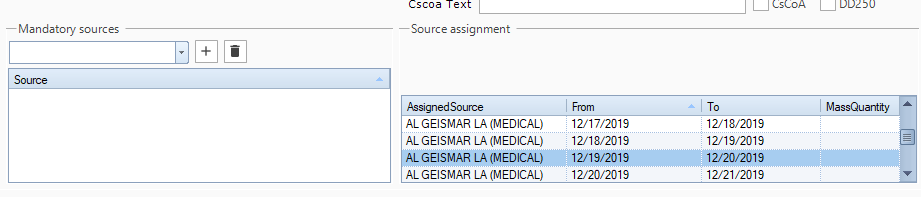
3.) To make the default source a mandatory source, click the arrow of the drop down, type the default source name and click the plus button. At this step, only the default source can be made mandatory.
3a.) Before a mandatory source is added that is a source other than the default source can be added, the default source must be added. Once step 3 is complete you can click the down arrow, type any ther source within the field and add accordingly.
Creating a new source
- 1. Email Ken Wade with the name and address of the source needing to be added in order to acquire an SAP (Business) Code, which is required to enter a new source into Alto
- 2 test